
Creating and Accessing Your DashKing88 Account: Registration and Login Explained
We keep getting into a DK88 account down to two moments: opening one, and signing back in every time after that. Below, we cover both in order — what our sign-up form asks for, the profile step we require before a first withdrawal, how login works once you're registered, and the one-account rule we enforce under the DashKing88 Terms and Conditions. We don't run a separate DK88 login page: sign-up and sign-in share the same screen, so this single guide is all a new or returning player needs from us.
How to Register
We keep DK 88 registration to one form, not a multi-page wizard, so your new DK88 account is ready to browse the moment you submit it — no separate confirmation step in between. Once you finish that form, nothing else stands between you and our bonuses, VIP program and games — nothing else needs setting up first. Because we built our platform around a single regional market, our form skips a country or currency selector entirely — the phone field is pre-formatted for Malaysia and that's the only region we support. Here's what our standard sign-up form collects:
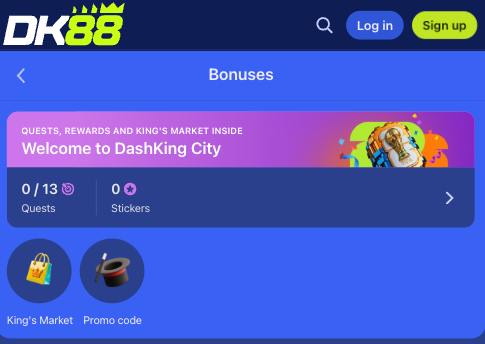
- Username — the name attached to your account going forward.
- Password — minimum 6 characters.
- Phone number — fixed to the +60 Malaysia format.
- Email address — used for account communication.
- Promo code — optional, leave it blank if you don't have one.
- Age and terms checkbox — confirms you're 18 or older and accept the Terms & Conditions.
To finish signing up:
- Open the sign-up form from the DK-88 homepage.
- Pick the standard form, or select "Sign up with Google" to register using an existing Google account instead, which skips most of the manual typing.
- On the standard form, enter a username, a password of at least 6 characters, your phone number in the +60 format, and your email address.
- Add a promo code if you have one — this step is optional.
- Tick the box confirming you're at least 18 and accept the Terms & Conditions.
- Submit the form to create the account and land in your new dashboard.
We don't ask for anything beyond these basic contact details at sign-up — identity documents and personal information come later, only once you're ready to withdraw, covered next. Whichever route you take through the form, the account it creates sits under the full DashKing88 name that appears in our bonus terms, even though the site and app both display the shorter DK88 branding day to day.
Completing Your Profile Before Your First Withdrawal
A finished sign-up form opens the account, but one more short step sits between that and your first withdrawal: a profile form. It's a guided set of fields rather than a document upload, and the same details double as account-recovery information if you ever need it. Our profile form asks for:
- Legal first name
- Legal last name
- Date of birth
- Country (pre-set to Malaysia)
- City
- A secret question and its answer
Filling in every required field is what unlocks the Save button and, in turn, the withdrawal itself. This step doesn't ask for a scanned ID or proof of address — it's a profile form, not a document check. Our Terms do allow a fuller document-based review later if needed, which can include proof of identity, proof of residence, proof of wealth or funds, confirmation of payment-account ownership, or a video-call verification, but that's a separate, later step rather than something the profile form itself requires. Most Dashking88 players clear the profile step in a couple of minutes and move straight on to requesting their first withdrawal.
How to Log In
Once you've opened a DK88 account with us, returning to it uses exactly the same credentials set during sign-up — nothing new to create or remember. The steps are short:
- Open the DK 88 login screen from the homepage.
- Enter your username (or email) and your password.
- Select "Log In" to reach your account and dashboard.
If the account was opened with "Sign up with Google," the same Google account continues to work as a one-click login on repeat visits, rather than typing a username and password every time. We haven't currently published a public password-recovery walkthrough on our DK88 site — if you're locked out, the fastest route back in is contacting our support through live chat or email so the team can help restore access directly rather than waiting on a self-service reset link.
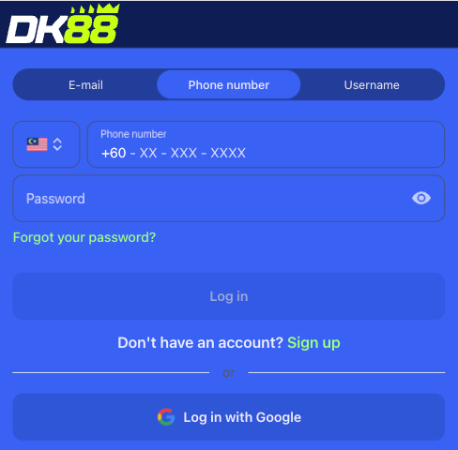
Your login credentials carry over to our mobile app once it's installed, so the same username and password work whether you're on desktop, a mobile browser, or the Dash King app itself. Nothing about the login step changes based on device — the account you registered is the one you're always signing back into, wherever you access DK88 from.
One Account Per Player
We run a single-account rule for every player at DK-88, set out in Section 3.7 of the DashKing88 Terms and Conditions. Only one account per person is permitted, and a few situations can trigger action against accounts that break that rule:
- Holding more than one account under your own name
- Opening an account using someone else's personal details
- Being part of a coordinated group of linked accounts
- Fraudulent transactions or payment chargebacks
- Collusion with other users
Where any of these apply, the wagering contract tied to the accounts involved can be voided. Registering once, with your own accurate details, keeps promotions, VIP progress and withdrawal history tied cleanly to a single identity — the straightforward way to stay clear of this rule entirely. Separately from multi-accounting, we also reserve the right to close any DK88 account at our own discretion, at any time, returning the remaining balance less any applicable withdrawal fees — a different situation from a Section 3.7 breach, but worth knowing alongside it.
FAQ
Is there a minimum password length when I register?
Yes. Your password needs at least 6 characters to complete the sign-up form.
Do I choose a country or currency when signing up?
No. The form has no country or currency selector, since it's built around a single regional market with a fixed +60 phone format.
Can I log in with the same details on both desktop and mobile?
Yes. Your username or email and password carry across desktop and mobile browsers, and into the app once installed.
What happens if I forget my password?
A public password-recovery walkthrough isn't currently published. Contact support through live chat or email and the team will help restore access.
Is there a separate login page for DK88?
No. Registration and login share the same screen, so returning players sign in from the same place a new account is created.
When do I need to complete my profile?
Before your first withdrawal. Registration itself only asks for basic contact details; legal name, date of birth, country, city and a secret question come later, at the profile step.